
Aggregated Ajax component
Overview
Finally I will show how to create the component that updates its view using asynchronous request. I will refactor existing non-Ajax aggregated Login Component, making a dual-mode component out of it, In non-Javascript environments it will work using Redirect-After-Post pattern. In browsers that have Javascript enabled, it will employ Ajax technique for In-Place Update.
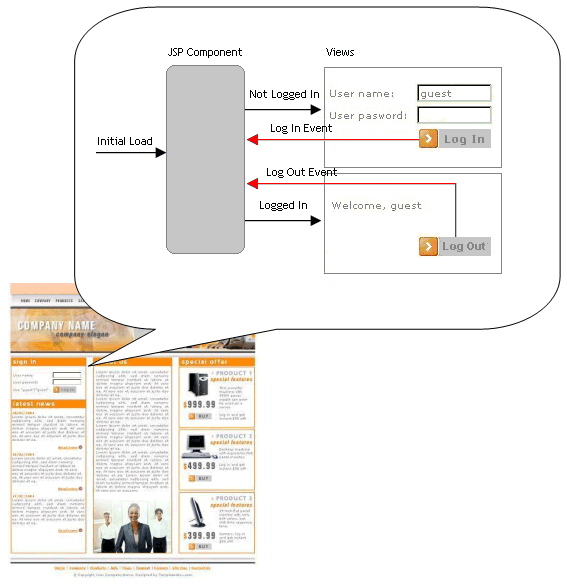
To ensure that the form is submitted in an asynchronous request I added an onsubmit event handler to HTML forms in both loginComponent-viewLogin.jsp and loginComponent-viewLogout.jsp views:
<form method="POST"
      action="loginComponent.jsp" focus="username"
      onsubmit="return processForm(this, action);">
The processForm function serializes form data into a query string, builds request object and sends an asynchronous request to the address specified in action parameter:
function processForm(frm, url) {
    var fd = new FormData(frm);
    if (fd) {
      var params = "ajax=true&" + fd.toQueryString();
    }

    req = getXMLHTTPRequest();
    if (req == null) return true;  // => submit syncronously

    req.onreadystatechange = processReqChange;
    req.open("POST", url, true);
    req.setRequestHeader( 'Content-Type', 'application/x-www-form-urlencoded' );
    req.send(params);
    return false;  // => prevent synchronous form submit
}
After processForm successfully initialized XMLHTTPRequest object and sent the request, it returns false. If problems were encountered, processForm returns true, and the form is submitted synchronously as if onsubmit handler was not defined. The same synchronous submit occurs if Javascript is not enabled in the browser. This ensures that the form gets submitted in both Ajax and non-Ajax environment.
processForm registers a callback function processReqChange that is called when component returns responds with updated view:
function processReqChange() {
  if (req.readyState == 4) {
    if (req.status == 200) {
      doc = req.responseXML;
      var source = doc.getElementsByTagName( "span" )[0];
      var id  = source.getAttribute( "id" );
      var target = document.getElementById(id);
      if( target != null ) {
        target.innerHTML = req.responseText;
      }
    }
  }
}
processReqChange assumes that component returns well-formed XHTML, and the view content is enclosed into a span element with id containing component name. Then processReqChange searches for an element on the page that has the same id. If found, it replaces the content of existing element with response content. To make this work I changed definition of the component in loginComponent.jsp file, adding outermost span element. The existing content of loginComponent.jsp file is kept intact within span element:
<%@ page contentType="text/html;charset=UTF-8" language="java" %>
<%@ taglib uri="http://java.sun.com/jstl/core" prefix="c" %>
<%@ taglib uri="/WEB-INF/jspcontrols.tld" prefix="jc" %>
<span id="LoginComponent">
  ...
</span>
I also prepared a <div> placeholder for updated view in the composite page, index.jsp:
<div id="LoginComponent">
    <jsp:include page="loginComponent.jsp" flush="false" />
</div>
The Ajax component actually works in both Ajax and non-Ajax environment. If the page content is not too elaborate and the browser renders a page in an off-screen buffer, you may not even notice the difference.
When the form is submitted asynchronously, the "ajax=true" flag is appended to query string. This makes the <reload> and <prerender> tags behave differently. In non-Ajax mode <reload> tag redirects to the master composite page, which brings up the page along with included fragments.
In Ajax mode <reload> tag continues the evaluation of the page. The <prerender> tag, defined further, sets the content type of the response to "text/xml" if request was made in asynchronous mode. Then Javascript function processes the response as XML and integrates returned fragment into master page.