
Aggregated non-Ajax component
Overview
After we have created a standalone login component, we will refactor it into an aggregated one. We will use a modified version of Redirect-After-Post pattern that not only solves major issues with implicit form resubmits, it also makes creating composite page without portlet container possible. This pattern is essential for non-Ajax RPF technology.
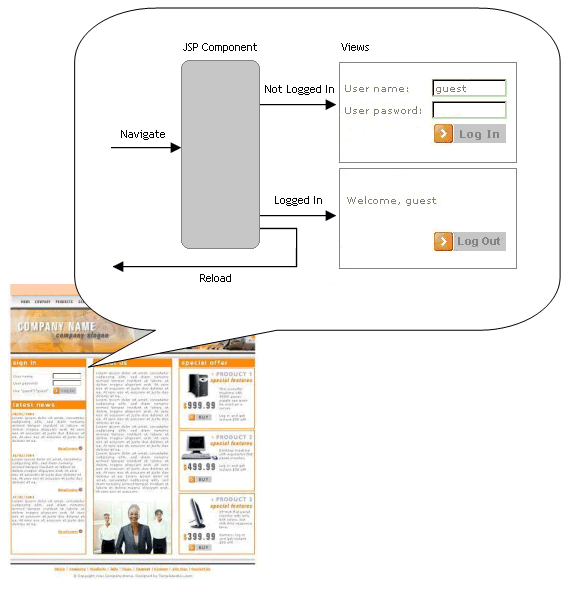
First, let us create a "parent" page, index.jsp. It is a composite page that aggregates Login Component. Of course, a composite page can contain several components, but we will limit ourselves to one this time:
<%@ page contentType="text/html;charset=UTF-8" language="java" %>

<html>
  <body>
    <style type='text/css'>
      .dottedframe {border: 2px dotted #fa9010; min-width: 30em; padding: 5px;}
    </style>

    <p class="dottedframe">This paragraph is defined directly in the parent page
    and should <strong>precede</strong> the content of login control.</p>

    <div class="dottedframe" id="LoginComponent">
      <jsp:include page="loginComponent.jsp"/>
    </div>

    <p class="dottedframe">This paragraph is defined directly in the parent page
    and should <strong>follow</strong> the content of login control.</p>
  </body>
</html>
The composite page serves as a logical frame to individual components, therefore it contains opening and closing HTML tags. The files comprising Login Component reside in the same directory with the composite page.
Two plain text paragraphs are defined in the page to make sure that content from the parent page, surrounding the component, is properly shown.
The component is dynamically inserted into a composite page using <jsp:include> action. This means, that servlet/JSP container inserts the actual HTML response generated by the component, not JSP code.
The component is defined in loginComponent.jsp file:
<%@ page contentType="text/html;charset=UTF-8" language="java" %>
<%@ page import="java.util.ArrayList,
                 net.jspcontrols.util.Constants"%>
<%@ taglib uri="http://java.sun.com/jstl/core" prefix="c" %>
<%@ taglib uri="http://jspcontrols.net/tags-core" prefix="jc" %>

<%-- **********************************************************************
     The stub for authentication service; allows only "user"/"pass" account
     ********************************************************************** --%>

<%!
    public boolean authenticate(String username, String password){
        return "user".equals(username) && "pass".equals(password);
    }
%>

<%-- **********************************************************************
     Input phase, either postback or regular link containing an event
     ********************************************************************** --%>

<jc:accept>

  <%-- Processing login --%>
  <jc:handler event="login">
    <%
        // Log out current user first
        session.removeAttribute("USER");

        // Read username and password submitted from dialog form
        String username = request.getParameter("username");
        String password = request.getParameter("password");

        // Store user name in session if needed to redisplay.
        // No need to redisplay password, so it is not stored.
        session.setAttribute("username", username);

        // Log the user in
        if (authenticate(username, password)) {
            session.removeAttribute("username");
            session.setAttribute("USER", username);

        // User accout is not found, generate error messages
        } else {
            ArrayList messages = new ArrayList();
            String message = "Account not found.";
            messages.add(message);
            session.setAttribute("MESSAGES", messages);
        }
    %>
  </jc:handler>

  <%-- Processing logout --%>
  <jc:handler event="logout">
    <%
        // Log out current user first
        session.removeAttribute("USER");
    %>
  </jc:handler>

  <%-- Accept phase has finished. Reload this page to render a view --%>
  <jc:reload/>
</jc:accept>

<%-- **********************************************************************
     Preender Phase: choose view corresponding to resource state
     ********************************************************************** --%>

<jc:render>
  <%
      pageContext.setAttribute(Constants.SELECTED_VIEW_NAME,
          session.getAttribute("USER") != null ? "loggedin" : "notloggedin"
      );
  %>
</jc:render>

<%-- **********************************************************************
     Common Render Phase: write out error messages and remove them from session
     ********************************************************************** --%>

<jc:render>
  <c:if test='${not empty sessionScope.MESSAGES}'>
    <c:forEach var='message' items='${sessionScope.MESSAGES}'>
      <ul>
        <li><b><c:out value='${message}'/></b></li>
      </ul>
    </c:forEach>
    <% session.removeAttribute("MESSAGES"); %>
  </c:if>
</jc:render>

<%-- **********************************************************************
     Render Phase: User is not logged in. Display login form.
     ********************************************************************** --%>

<jc:render view="notloggedin">
  <jsp:include page="loginComponent-viewLogin.jsp" />
</jc:render>

<%-- **********************************************************************
     Render Phase: User is logged in. Display user info and logout form.
     ********************************************************************** --%>

<jc:render view="loggedin">
  <jsp:include page="loginComponent-viewLogout.jsp" />
</jc:render>

<%-- **********************************************************************
     Render Phase: Clean messages so they won't display on refresh.
     ********************************************************************** --%>

<jc:render>
  <% session.removeAttribute("MESSAGES"); %>
</jc:render>
This does not differ much from standalone component that we have built before. The opening and closing HTML tags are not defined in the component, they are defined in the parent page. Another change is that the views are factored out to the separate JSP files for brevity. The same could be done for standalone component too.
The login panel is defined in loginComponent-viewLogin.jsp file:
<%@ page contentType="text/html;charset=UTF-8" language="java" %>
<%@ taglib uri="http://java.sun.com/jstl/core" prefix="c" %>

  <h3>Log In</h3>

  <form action="loginComponent.jsp" focus="username">
    <table>

      <!-- username and password -->
      <tr>
        <td align="left">Username:</td>
        <td><input type="text"
                   name="username" maxlength="20" size="20"
                   value="<c:out value='${username}'/>" /></td>
      </tr>

      <tr>
        <td align="left">Password:</td>
        <td><input type="password"
                   name="password" maxlength="20" size="20"
                   value="" /></td>
      </tr>

      <!-- Logoff and cancel buttons-->
      <tr>
        <td></td>
        <td align="left">
          <input type="submit"
                 name="login.jspcontrols.event"
                 value="Log In" />
        </td>
      </tr>
    </table>

    <!-- Points where to reload parent composite page from -->
    <input type="hidden"
           name="jspcontrols.location.parent"
           value="<%=request.getRequestURL().toString()%>" />
  </form>
  <p><em>Username is "user", password is "pass".</em></p>
Two things are different from standalone component. First, the HTML FORM tag explicitly sets the action attribute to the login component. Second, the form defines a hidden field that stores parent page location. This field is set automatically when the page is being rendered by JSP engine.
The logout panel looks similar:
<%@ page contentType="text/html;charset=UTF-8" language="java" %>
<%@ taglib uri="http://java.sun.com/jstl/core" prefix="c" %>

  <h3>Log Out</h3>

  <form action="loginComponent.jsp">
    <table>

      <!-- User information -->
      <tr>
        <td align="left">Username:</td>
        <td><c:out value="${sessionScope.USER}"/></td>
      </tr>

      <!-- Logoff and cancel buttons-->
      <tr>
        <td></td>
        <td align="left">
          <input type="submit"
                 name="logout.jspcontrols.event"
                 value="Log Out" />
        </td>
      </tr>
    </table>

    <!-- Points where to reload parent composite page from -->
    <input type="hidden"
           name="jspcontrols.location.parent"
           value="<%=request.getRequestURL().toString()%>" />
  </form>
The aggregated component took additional effort to develop, now let us see was the trouble worth the result. When the browser navigates to index.jsp page, the server evaluates the included component, and renders its view as an included fragment. The resulting HTML looks like this:
<html>
  <body>
    <style type='text/css'>
      .dottedframe {border: 2px dotted #fa9010; min-width: 30em; padding: 5px;}
    </style>

    <p class="dottedframe">This paragraph is defined directly in the parent page
    and should <strong>precede</strong> the content of login control.</p>

    <div class="dottedframe" id="LoginComponent">

  <h3>Log In</h3>

  <form action="loginComponent.jsp" focus="username">
    <table>

      <!-- username and password -->
      <tr>
        <td align="left">Username:</td>

        <td><input type="text"
                   name="username" maxlength="20" size="20"
                   value="" /></td>
      </tr>

      <tr>
        <td align="left">Password:</td>
        <td><input type="password"
                   name="password" maxlength="20" size="20"
                   value="" /></td>
      </tr>

      <!-- Logoff and cancel buttons-->

      <tr>
        <td></td>
        <td align="left">
          <input type="submit"
                 name="login.jspcontrols.event"
                 value="Log In" />
        </td>
      </tr>
    </table>

    <input type="hidden"
           name="jspcontrols.location.parent"
           value="http://localhost:8080/jspcontrols/login-fragment/index.jsp" />

  </form>
  <p><em>Username is "user", password is "pass".</em></p>

    </div>

    <p class="dottedframe">This paragraph is defined directly in the parent page
    and should <strong>follow</strong> the content of login control.</p>
  </body>
</html>
Notice, that "action" attribute of the form points to the JSP file that contains component definition, not to index.jsp file. Also notice that hidden field containing location of parent page is resolved. When the user fills in the account information and submits the form, the request goes directly to Login Component and is evaluated by login handler. If account information was specified correctly, the component sets USER variable in the session.
Next, the Reload tag looks for jspcontrols.location.parent request parameter. If found, Reload tag uses this value as redirect destination. In our case, this value is set to "index.jsp". Therefore, browser is redirected to composite index.jsp page and loads it up.
When browser [re]loads the composite page, it pulls up included components with a "clean" GET request. Therefore, components skip the accept phase an render themselves according to their state. Voila, the Login Component just rendered the logout panel. No central controller, no portlet API. Other components on the composite page did not know what happened, they were just asked to rerender themselves. If you need inter-component communication, you can roll out your own API, like exchnaging data via session object.
The free gift is that browser page history is kept clean. A user cannot go back to the stale login page simply because Back button is not enabled. From browser's point of view, the same parent page was reloaded, so there was no reason to add an element to page history.*
*Opera updates browser history for every request, even made to the same location.